Restoring my 10 year old WebGL Minecraft clone

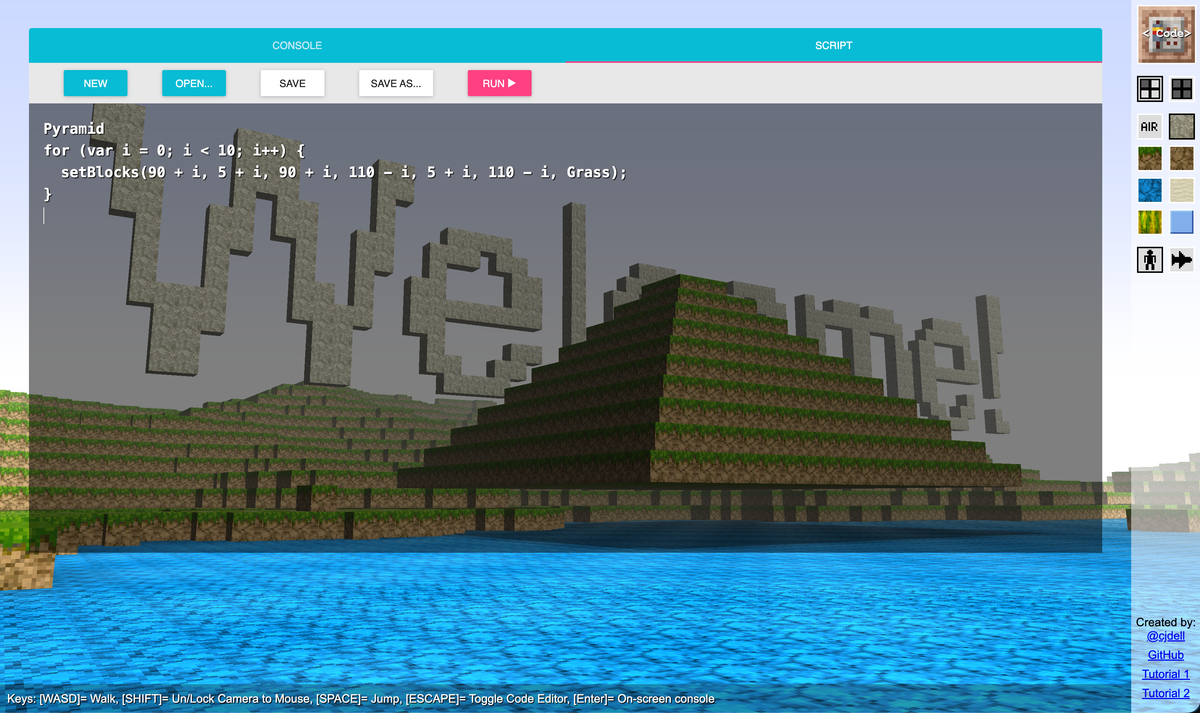
TL;DR; Here's the running application.
10 years ago I built a Minecraft clone, but with a twist. At the time I was doing a lot of STEM activities, introducing children to programming for the first time. The Raspberry Pi was in full swing and was popular as an educational tool. It even had it's own version of Minecraft complete with a Python API so people can write programs to interact with the Minecraft world. What better way to get kids hooked on programming, right?
There was a problem though. Raspberry Pi's were cool, but not accessible to most people. Yes, they were cheap, but it required a screen and place to set up along with a keyboard and mouse and probably a network connection. Many people would borrow their household TV, which meant constant unplugging and replugging. It also wasn't convenient for the "roadshow" type of events I participating in as a STEM ambassador, as there was no such thing as a Raspberry Pi laptop.
So I thought, why use a Pi at all? Surely we can achieve the same learning experience on any computer? So I built WebBlocks, which was basically the Minecraft Pi Edition with a somewhat similar API (except using JavaScript) running in a web browser. Now anyone with a computer could take part!
That was all 10 years ago. Eventually I stopped doing the STEM activities and lost the original domain name. This week I clone the original Git repo with the last commit dated 2016 to see if I could get it to build. I wasn't looking forward to working with crusty old code!
The first step was pulling the original NPM dependencies. npm struggled to pull all the original versions. Weirdly deno (an alternative runtime) was able to (perhaps due to using a different cache) but deno couldn't run the ancient version of webpack needed to compile and bundle the JavaScript.
Surprisingly, after deno had retrieved the dependencies node could now build the project at this point, and I had a working app! But things were very fragile, and the IDE could not work with TypeScript 1.8 (before even strict mode existed!).
So I decided to upgrade all the way to TypeScript 6.0 but this also meant I had to upgrade WebPack. Ideally I would have done one thing at a time with minimal breaking changes but since I was likely going to have to work through every source file anyway I realised I should probably just buckle up at this point.
A new tsconfig.json and webpack.config.ts was required. I opted to keep strict mode off for now as it didn't exist at the time and would cause hundreds of errors if enabled.
Luckily I had mostly used ES module imports but there were still a few old require calls dotted around.
import THREE = require('three');
// becomes
import * as THREE from 'three';
Removing old polyfills, remember when Promise and fetch was experimental?
// Delete these
require('whatwg-fetch');
require('es6-promise').polyfill();
This bug was more interesting, apparently classes are constructed differently now, and old reflection code breaks. This required some debugging to discover as it was not caught by the compiler.
Object.keys(Api.prototype).forEach(key => {
  // ...
});
// becomes
Object.getOwnPropertyNames(Api.prototype).forEach(key => {
  // ...
});
Also, since TypeScript is much more sophisticated than it was, it also caught some original bugs that I hadn't noticed when writing the original project! Particularly ones involving typed arrays, i.e. Float32Array and Uint32Array.
The sample scripts which were imported as text files relied on a weird hack that abused the require('fs') syntax so this needed to change. We have a special way to import raw assets now thanks to esnext.
import Cube from '../samples/Cube.js' with { type: "text" };

Cube.toString(); // Use the raw text content
Now we have a (somewhat) maintainable program! Many of the libraries (like THREE.js are still ancient but the IDE can at least work with the modern TypeScript and the build system is now up-to-date as well.
I might do some more refits as I forgot how cool this project was and I still think it can be a great tool for learning code and fun experiments!
Happy coding!